
Minecraft isn’t just a survival game anymore—it’s a creative platform where people build entire worlds that reflect imagination, planning skills, and design thinking. Over time, simple starter houses and random block structures have evolved into highly detailed cities, themed builds, and most impressively, full luxury kingdoms. In 2026, Minecraft kingdom building has reached a level where layouts are no longer just about placing buildings—they are about storytelling, structure, and visual hierarchy.
A luxury Minecraft kingdom is not defined by how big it is, but by how intentionally it is designed. You can have a massive world filled with structures and still end up with something that feels messy or disconnected. On the other hand, a well-planned medium-sized kingdom can look far more impressive if every area has a purpose, flow, and visual identity. This is where most players struggle—they build without layout planning.
The biggest mistake Minecraft builders make is starting with buildings before deciding the structure of the kingdom. They place castles, houses, farms, and towers randomly, and later realize the world feels chaotic. There is no central focus, no organized districts, and no natural movement between areas. A luxury kingdom is the opposite of that. It is structured like a real civilization, where every zone has meaning and every pathway leads somewhere intentional.
In modern Minecraft design, especially in 2026 builds, layout planning has become just as important as building itself. Players now think like architects and city planners. They divide kingdoms into zones such as royal districts, market areas, residential villages, magical forests, harbor sections, and defensive walls. Each area is designed with a different mood, block palette, and purpose, but still connected through a unified theme.
Another key factor in luxury Minecraft kingdoms is visual balance. Not every structure should compete for attention. Instead, there should be a clear hierarchy—like a central castle or palace that acts as the focal point, surrounded by supporting structures that gradually decrease in scale and importance. This creates depth and realism, making the kingdom feel like a living world instead of a random collection of builds.
Pathways and terrain shaping also play a huge role. Flat, unconnected land often makes builds feel artificial. Luxury layouts use natural elevation, rivers, bridges, and curved paths to guide movement and create visual storytelling. Even small details like lantern placement, garden spacing, and wall alignment contribute to the overall atmosphere.
Lighting and material consistency are also important in high-level Minecraft design. Luxury kingdoms often stick to a controlled palette—stone, dark oak, quartz, copper, or themed blocks depending on the style. Mixing too many materials without planning leads to visual noise, while consistent palettes create a premium, cohesive look.
What separates beginner builds from luxury kingdoms is not just effort, but planning discipline. A well-designed layout makes building easier, faster, and more satisfying because every structure has a defined place before it is even built. You are no longer guessing—you are executing a vision.
In this guide, you will explore structured luxury kingdom layout ideas that focus on real-world architectural logic adapted into Minecraft. These ideas are not just about decoration—they are about organization, flow, and world-building strategy. Each layout concept is designed to help you build kingdoms that feel immersive, intentional, and visually powerful.
Now let’s break down the layout ideas that transform simple Minecraft worlds into luxury kingdoms that actually feel alive.
1. Central Royal Castle with Radiating City Districts
What it is
This is the most classic “luxury kingdom” layout, but when done correctly, it becomes the most powerful and visually dominant design. The entire kingdom is built around one central structure—the royal castle. From this center point, all other districts radiate outward like organized layers of civilization. Instead of random placement, everything has direction, hierarchy, and controlled expansion.
The idea is simple but strict: the castle is the heart, and everything else exists to support it. Markets, houses, farms, stables, and temples are not scattered—they are placed in structured zones around the main palace.
This layout works because it naturally creates a focal point. When you look at the kingdom from a distance, your eyes immediately go to the center, then gradually move outward into detail. That is what makes it feel “luxury” instead of chaotic.

How to implement (practical steps)
Start by choosing a central elevated area or flattening a controlled section of land. Build your royal castle first—this is non-negotiable. The castle determines the scale of everything else.
Once the castle is placed, divide the surrounding land into circular or square “rings.” The closest ring should contain elite structures like royal gardens, throne courtyards, or guard towers. These should feel premium and highly detailed.
The second ring can include administrative buildings, libraries, and noble houses. These structures should still feel important but slightly less grand than the castle zone.
The outer ring should contain everyday life areas like villages, farms, stables, and marketplaces. This creates a natural social hierarchy within your build.
Connect all zones using planned pathways. Avoid straight random roads—use curved, decorated paths with lanterns, trees, and bridges to guide movement naturally.
Best for (who should use it)
This works best when you want a powerful, “main kingdom” aesthetic rather than scattered builds. It is ideal for survival worlds where you plan to expand over time because you can keep adding new rings outward.
It also suits builders who like structure, symmetry, and controlled expansion instead of random creativity.
Pro tip
Use elevation changes between rings. Even small height differences between districts make the kingdom feel more realistic and layered, like a real civilization built over time.
Mistake to avoid
Do not build outer districts before defining the central castle. Without a strong center, the layout loses meaning and becomes just another flat city instead of a true kingdom.
2. River-Flow Kingdom Layout with Natural Division Zones
What it is
The river-flow kingdom layout uses natural water systems as the backbone of your entire world. Instead of forcing straight roads or artificial zoning, the kingdom is built along rivers, streams, or lakes that naturally divide areas. Each section of the kingdom exists along the water, creating a flowing, organic civilization design.
This layout feels extremely immersive because it mimics how real ancient kingdoms were built—near water sources, with cities expanding along riverbanks. It also creates natural beauty because water becomes a constant visual element throughout the build.

How to implement (practical steps)
Start by generating or shaping a main river that flows through your kingdom area. This river will act as the “spine” of your entire layout. Make sure it curves naturally instead of being straight.
Place your main castle or palace near a key bend or central point of the river so it becomes visually connected to the water. Add bridges to connect both sides of the kingdom.
Divide the land along the river into distinct zones:
- One side can be the royal and administrative district
- The other side can be residential villages and farming areas
- Farther along the river can be trade ports or dock zones
Each section should feel independent but still connected through bridges, boats, and pathways.
Add small details like waterfalls, fishing docks, wooden piers, and river lanterns to enhance realism.
Best for (who should use it)
This works best for players who enjoy natural terrain building rather than strict symmetry. It is ideal for survival worlds where you want the environment to guide your design.
It also suits players who like scenic, cinematic builds that look realistic from multiple angles.
Pro tip
Use different materials for each river section to subtly distinguish zones—like stone in royal areas, wood in villages, and darker tones in industrial sections. This adds visual clarity without breaking harmony.
Mistake to avoid
Do not force straight roads that ignore the river shape. The entire point of this layout is flow—forcing geometry onto it destroys the natural kingdom feel.
3. Mountain Fortress Kingdom with Tiered Elevation System
What it is
The mountain fortress kingdom layout is built vertically instead of flat. The entire civilization is constructed on different elevation levels of a mountain or cliff system. The highest point usually holds the royal castle or fortress, while lower levels contain supporting structures like villages, farms, and military zones.
This layout creates a dramatic “power hierarchy” through height. The higher you go, the more important the structure becomes. It gives the kingdom a strong visual identity and makes it feel defensive, powerful, and naturally protected.
In 2026 Minecraft design trends, vertical kingdoms are becoming extremely popular because they look cinematic and feel more realistic than flat city builds.

How to implement (practical steps)
Start by finding a large mountain or creating a custom terraformed elevation. Choose the highest point as your main castle location. This immediately establishes dominance in the build.
From the top, design downward layers:
- Top layer: Royal castle, throne room, elite guard towers
- Middle layer: Noble houses, temples, libraries, training grounds
- Lower layer: Villages, farms, storage areas, and marketplaces
Connect each layer using stair paths, winding stone roads, or layered bridges carved into the mountain. Avoid straight staircases everywhere—curved pathways feel more natural and immersive.
Add defensive walls and towers at key mountain edges to reinforce the fortress theme. Use stone, cobblestone, and deep slate for a strong, ancient aesthetic.
Include hidden tunnels or cave systems as secret pathways between layers to add depth and exploration value.
Best for (who should use it)
This works best for players who enjoy dramatic builds with strong visual storytelling. It is perfect for survival mode because mountains naturally provide defense and structure.
It also suits players who prefer detailed exploration-based builds rather than flat city planning.
Pro tip
Add waterfalls or hanging bridges between mountain layers. These small dynamic elements make the kingdom feel alive instead of static.
Mistake to avoid
Do not flatten the mountain too much. The entire identity of this layout depends on natural elevation differences—removing them destroys the concept completely.
4. Floating Sky Kingdom with Layered Island Network
What it is
The floating sky kingdom layout is a vertical fantasy-style design where the entire civilization is built on multiple floating islands connected in mid-air. Instead of a grounded map, the kingdom exists above the world, creating a surreal, high-luxury fantasy aesthetic. Each island has a specific purpose—royal, residential, agricultural, magical, or industrial—forming a layered sky civilization.
This layout feels “luxury” in Minecraft because it removes terrain limitations completely. Everything is intentional, suspended, and visually dramatic. It also naturally creates separation between districts without needing roads or walls.

How to implement (practical steps)
Start by selecting a central floating island that will serve as the royal core. This island should be the largest and highest priority structure—usually a castle or palace with strong visual detail.
Next, build surrounding islands at different heights and distances. Each island should have a purpose:
- One island for housing villages
- One for farms and food production
- One for magical or aesthetic gardens
- One for military towers or defense systems
Connect islands using bridges, chains, floating pathways, or even controlled water streams depending on your theme. Keep connections intentional but not overly dense—sky kingdoms should feel open and vast.
Use cloud-like terrain shaping (using wool, quartz, or white blocks) to create soft transitions between islands. Lighting is extremely important here—add lanterns or glow blocks under islands to create a floating illusion.
Best for (who should use it)
This works best for creative mode builders or advanced survival players with access to resources. It suits players who want a fantasy, cinematic, or magical kingdom aesthetic.
It is also ideal for people who prefer visual storytelling over realistic architecture.
Pro tip
Vary island heights slightly instead of making them all equal. This creates depth and makes the kingdom feel more natural and less “grid-like.”
Mistake to avoid
Do not overcrowd islands with too many structures. Sky kingdoms rely on open space and negative space to look impressive. Overbuilding makes it feel cluttered and loses the floating effect.
5. Coastal Harbor Kingdom with Trade District Focus
What it is
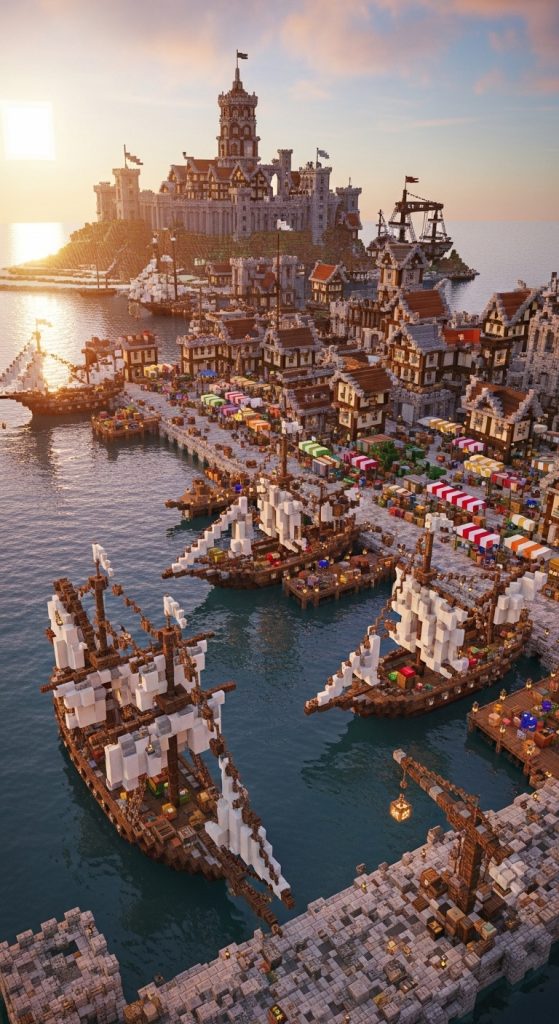
The coastal harbor kingdom layout is built along a shoreline where the ocean becomes the main economic and visual element of the entire civilization. The kingdom is designed around trade, ships, docks, and waterfront districts. Instead of a central castle being the only focus, the harbor acts as the heartbeat of the kingdom.
In 2026 Minecraft design trends, coastal kingdoms are extremely popular because they feel alive and dynamic. Ships, movement, and water reflections add constant visual activity to the build.
How to implement (practical steps)
Start by selecting a large coastline or creating a custom shoreline with curves instead of straight edges. The natural shape of the coast is important because it defines where districts will form.
Place the main harbor first. Build docks, shipyards, storage warehouses, and trading posts directly along the water. Use wood, barrels, stone bricks, and chains to create an industrial nautical feel.
Next, place the royal or administrative district slightly inland but still visually connected to the harbor. This represents governance and control over trade.
Behind the harbor area, build residential zones for villagers or citizens. These should feel slightly less structured but still organized along roads that lead to the docks.
Add ships in the water, cranes on docks, and market stalls near the shoreline to create movement and life.
Best for (who should use it)
This works best for players who enjoy storytelling-based builds and want a kingdom that feels functional and alive rather than purely decorative.
It is ideal for survival worlds where trading and resource movement matter.
Pro tip
Use different wood types for docks and ships to create variety—spruce for structure, dark oak for depth, and stripped logs for detail. This makes the harbor feel rich and layered.
Mistake to avoid
Do not build everything too far from the water. The entire identity of this layout depends on close interaction with the shoreline—if structures are placed randomly inland, the harbor concept loses impact.
6. Walled Medieval Grid Kingdom with Structured District Blocks
What it is
The walled medieval grid kingdom is a highly organized layout where the entire kingdom is divided into structured square or rectangular districts, all enclosed within strong defensive walls. Unlike natural or flowing layouts, this design focuses on order, planning, and controlled expansion.
Each block inside the grid has a specific purpose—residential, royal, farming, military, or commercial. Roads are straight and clearly defined, creating a sense of discipline and civilization growth.
This layout is considered “luxury” not because it is decorative, but because it feels engineered, like a real historical city that expanded with logic and structure.

How to implement (practical steps)
Start by building a strong outer wall around your entire kingdom area. Use stone bricks, cobblestone, or deep slate to create a fortified medieval feel. Add towers at regular intervals for defense and visual rhythm.
Inside the walls, divide the land into equal grid sections using paths or roads. Each section should be clearly separated and assigned a purpose:
- One block for royal castle and courtyard
- One for residential houses
- One for farms and food production
- One for storage and blacksmithing
- One for markets and trade
Build roads first before adding structures. This prevents random placement and keeps the layout clean.
Keep building heights slightly varied between districts to avoid a flat visual effect. The royal area should always be the tallest and most detailed.
Best for (who should use it)
This works best for players who prefer structured planning and efficient building. It is ideal for survival worlds where organization and resource management matter.
It also suits builders who enjoy medieval or realistic city aesthetics.
Pro tip
Add small decorative variations inside each grid block—like trees in residential zones or lantern posts in market areas—to prevent the layout from feeling too rigid.
Mistake to avoid
Do not break the grid randomly. The strength of this layout comes from consistency—random placement destroys the entire structured kingdom concept.
7. Jungle Temple Kingdom Hidden in Dense Canopy
What it is
The jungle temple kingdom layout is a hidden civilization built deep inside dense jungle terrain. Instead of open, visible cities, this design focuses on secrecy, layering, and integration with nature. Structures are partially covered by vines, trees, cliffs, and natural terrain, making the kingdom feel ancient, mysterious, and lost in time.
This layout works because it doesn’t fight the environment—it uses it. Trees become walls, rivers become pathways, and cliffs become natural defenses. The “luxury” in this style doesn’t come from brightness or symmetry, but from depth, storytelling, and discovery.

How to implement (practical steps)
Start by selecting a dense jungle biome with uneven terrain. Avoid flattening it too much; the natural chaos is what gives this layout identity.
Place your main temple or palace deep inside the jungle, not on the edge. It should feel hidden, almost like it has to be discovered. Use mossy stone bricks, cracked stone, vines, and jungle wood to build the core structure.
Then create smaller connected structures around it:
- Hidden villages between trees
- Rope bridges connecting high platforms
- Small shrines or ritual areas near rivers
- Storage or farm areas disguised within foliage
Use natural elevation like tree canopies and cliffs as secondary building layers. Add vines everywhere to blend structures into the environment.
Paths should not look like modern roads—use stone slabs, dirt trails, and broken-looking walkways to maintain the ancient aesthetic.
Best for (who should use it)
This works best for players who enjoy storytelling, exploration, and immersive worlds. It is ideal for survival worlds where hiding, survival, and natural integration matter.
It also suits players who prefer fantasy, ancient civilization themes over modern design.
Pro tip
Use multiple layers of vegetation (trees, vines, leaves) around every structure. The more naturally “overgrown” it looks, the more realistic and immersive the kingdom becomes.
Mistake to avoid
Do not clear large areas of jungle to build clean structures. That destroys the entire identity of this layout. The kingdom should feel discovered, not constructed.
8. Desert Oasis Kingdom with Central Water Core
What it is
The desert oasis kingdom layout is built around a single life source in an otherwise harsh and dry environment. The entire civilization grows outward from a central oasis, making water the most valuable and visually dominant feature.
This layout creates strong contrast—golden sand, warm tones, and lush greenery concentrated around water. It feels rich, strategic, and naturally realistic because real ancient kingdoms often formed around oases.

How to implement (practical steps)
Start by creating or locating a natural desert biome. Then carve out a central water source area—this will be your oasis. Shape it naturally with curves instead of a perfect circle.
Build your palace or central royal structure directly beside or partially surrounding the oasis. Use sandstone, smooth sandstone, and terracotta to match the desert palette.
Around the oasis, create dense greenery: palm trees, small gardens, and farms. This area represents life and luxury within the desert.
Extend the kingdom outward in layers:
- Inner layer: Royal palace and gardens
- Middle layer: Marketplaces and residential areas
- Outer layer: Farms, watchtowers, and desert defenses
Use pathways made of sandstone slabs or packed sand to connect all zones.
Add water channels that extend from the oasis into different parts of the kingdom to simulate irrigation systems.
Best for (who should use it)
This works best for players who enjoy strong visual contrast and environmental storytelling. It is ideal for survival worlds where resource management and water placement feel meaningful.
It also suits players who like warm-toned, cinematic builds.
Pro tip
Add small details like hanging lanterns, tents, and palm leaf shading structures to make the oasis feel lived-in and realistic.
Mistake to avoid
Do not spread water randomly across the desert. The entire concept depends on water being rare and centralized—too much water destroys the theme.
9. Volcanic Fortress Kingdom with Lava Ring Defense System
What it is
The volcanic fortress kingdom layout is a high-intensity, dramatic design built around lava, blackstone, and elevated fortress structures. The kingdom is often placed near or on a volcano, with lava flows acting as natural defenses and visual highlights.
This layout feels powerful and aggressive. Instead of soft luxury, it represents dominance, strength, and danger. The “luxury” comes from controlled chaos—carefully designed lava flows, layered blackstone architecture, and fortress-like symmetry.

How to implement (practical steps)
Start by selecting a mountain or volcanic terrain. If none exists, terraform one using stone, netherrack, and basalt.
Place your central fortress at the highest or most stable point. This should be a strong, fortified castle built with blackstone, deep slate, and stone bricks.
Design lava flows around the kingdom as natural barriers. These should not be random—shape them into controlled streams or ring-like defenses.
Divide the kingdom into zones:
- Inner core: Royal fortress and elite chambers
- Mid zone: Military barracks, armories, and storage
- Outer zone: Industrial areas, lava-forged structures, and guarded villages
Use bridges, basalt pillars, and obsidian pathways to connect areas safely across lava zones.
Add smoke, fire details, and glowing blocks for atmospheric depth.
Best for (who should use it)
This works best for players who enjoy dark fantasy, powerful aesthetics, and dramatic builds. It is ideal for creative mode or advanced survival players with access to rare materials.
It suits builders who want their kingdom to look intimidating and visually intense.
Pro tip
Use contrasting lighting—glowstone or shroomlights—to balance the dark materials and lava glow. This prevents the build from looking too dark or unreadable.
Mistake to avoid
Do not place lava randomly without structure. Controlled placement is what makes this layout look intentional and “luxury,” not chaotic or unsafe.